Wednesday, September 29, 2010

Smart Security

Smart Security is a rogue security product that pretends to find malicious code on a victim’s machine in order to frighten him or her into purchasing a useless application.

It’s a new rebranded clone of the FakeVimes family, replacing the MySecurityShield: Smart Security

Smart Security graphic interface:

  
(Click on graphic to enlarge)

Smart Security phony warning screens


 (Click on graphic to enlarge)


 (Click on graphic to enlarge)

Results of Smart Security fake scan:


(Click on graphic to enlarge)

Smart Security installation page


 (Click on graphic to enlarge)

Smart Security creates a directory %Documents and Settings%\All Users\Application Data\56aec5\


(Click on graphic to enlarge)

How to remove SmartSecurity.FakeVimes:

If  SmartSecurity.FakeVimes has infected your pc, you should remove it immediately. Click here to use VIPRE to remove SmartSecurity.FakeVimes from your computer now.

Tuesday, September 28, 2010

PC Defender Antivirus (Russian)

Today we found a Russian-language version of the PC Defender Antivirus rogue security product. It isn’t really new since it’s been in VIPRE detections. What is new in this version is that it is targeting Russian-speaking victims. In the past we’ve seen a conscious effort on the part of rogue authors NOT to target Russians. The accepted theory there is that authorities in Russia tolerate miscreants who use the Internet as long as they only prey on foreigners.

On install, a fake blue screen appears saying “the problem seems to be in your antivirus software” inferring, of course, that you should shut it down.


 (Click on graphic to enlarge)


Running the MSI installer immediately reboots the victim’s computer and he or she gets the userinit registry hijacking entry:

REG:system.ini: UserInit=C:\WINDOWS\system32\userinit.exe,"C:\Program Files\Def Group\PC Defender\pcdef.exe"

The folder that was created and files dropped in it match our earlier detection for PCDefenderAntivirus although this is a Russian language version.

PC Defender Antivirus then pretends to find malicious code from a (non existent) gay porn site on the victim’s machine in order to frighten him or her into purchasing this useless application.

PC Defender Antivirus graphic interface.

Of course this is only a trial version (“пробная версия”)

(Click on graphic to enlarge)

Fake alert screen:

опасность!
(Danger)


(Click on graphic to enlarge)

Under the porn image (which we’ve covered up) is the Russian text “этот вирус возможно с сайта.” That translates to “the virus probably came from this site.”

The site (gay-porn-world.net) that the alleged malware came from doesn’t exist:


How to remove PC Defender Antivirus:

If  PC Defender Antivirus has infected your pc, you should remove it immediately. Click here to use VIPRE to remove PC Defender Antivirus from your computer now.

Wednesday, September 22, 2010

Antivirus8

Antivirus8 is a rogue security product in the Antivirus XP 2010 family that pretends to find malicious code on a victim’s machine in order to frighten him or her into purchasing this useless application. VIPRE detects it as Antivirus8.FakeXPA.

The Antivirus8 graphic interface:


(Click on graphic to enlarge)

Antivirus8 fake scan:

(Click on graphic to enlarge)

Antivirus8 installer:

(Click on graphic to enlarge)

Antivirus8 payment screen:

(Click on graphic to enlarge)

How to remove Antivirus8.FakeXPA:

If Antivirus8.FakeXPA has infected your pc, you should remove it immediately. Click here to use VIPRE to remove Antivirus8.FakeXPA from your computer now.

Monday, September 20, 2010

Nava Shield

Nava Shield is a rogue security product that runs a fake “scan” and pretends to find malicious code on a victim’s machine in order to frighten him or her into purchasing fraudulent non-functioning software.

A fake Nava Shield scan:

(click on graphic to enlarge)

Fake detection and “fix.”

(click on graphic to enlarge)

After a scan, Nava Shield claimed it was “neutralizing” files that weren’t even on a test computer.


(click on graphics to enlarge)

When installed, Nava Shield creates a directory structure in C:\Program Files\ and installs the below files:

(click on graphic to enlarge)

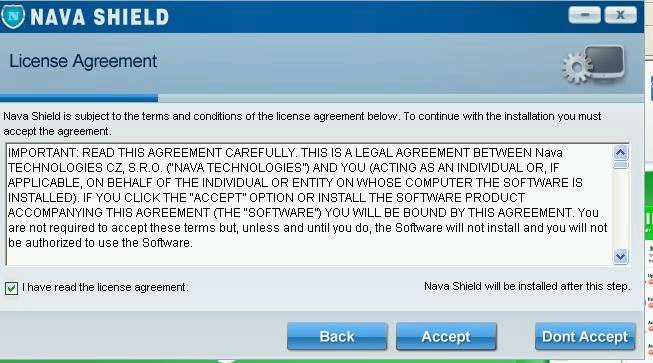
It shows the victim a “License Agreement”

(click on graphic to enlarge)

The “Nava Shield Terms” probably were not written by a native speaker of English:

(Click on graphic to enlarge)

It also displays fake certifications. The McAfee Secure logo should be a link to that service, but in Nava Shield it's a simple graphic.

(Click on graphic to enlarge)

How to remove Nava Shield:

If Nava Shield has infected your pc, you should remove it immediately. Click here to use VIPRE to remove Nava Shield from your computer now.

Thursday, September 16, 2010

AnVi.FakeCog

AnVi.FakeCog is a rogue security product that pretends to find malicious code on a victim’s machine in order to frighten him or her into purchasing this useless application. This rogue is downloaded after the TDss Rootkit has infected a computer. After installation it attempts to remove MalwareBytes anti-malware protection.

The main method for distribution of AnVi.FakeCog is by exploits that take advantage of a vulnerability in applications that use .pdf format files.

AnVi.FakeCog uses the rather unimaginative name “Antivirus” on its graphic interface:

(Click on graphic to enlarge)

The AnVi.FakeCog installer looks like this:

(Click on graphic to enlarge)

A machine infected with AnVi.FakeCog shows the following files:

(Click on graphic to enlarge)

Files and directories installed:

c:\Program Files\AnVi\
c:\Program Files\AnVi\about.ico
c:\Program Files\AnVi\activate.ico
c:\Program Files\AnVi\avt.db
c:\Program Files\AnVi\avt.exe
c:\Program Files\AnVi\avtext.dll
c:\Program Files\AnVi\avthook.dll
c:\Program Files\AnVi\buy.ico
c:\Program Files\AnVi\help.ico
c:\Program Files\AnVi\scan.ico
c:\Program Files\AnVi\settings.ico
c:\Program Files\AnVi\splash.mp3
c:\Program Files\AnVi\Uninstall.exe
c:\Program Files\AnVi\update.ico
c:\Program Files\AnVi\virus.mp3
%UserProfile%\Application Data\Microsoft\Internet Explorer\Quick Launch\Antivirus.lnk
%UserProfile%\Desktop\Antivirus Support.lnk
%UserProfile%\Desktop\Antivirus.lnk
%UserProfile%\Desktop\nudetube.com.lnk
%UserProfile%\Desktop\pornotube.com.lnk
%UserProfile%\Desktop\spam001.exe
%UserProfile%\Desktop\spam003.exe
%UserProfile%\Desktop\troj000.exe
%UserProfile%\Desktop\youporn.com.lnk
%UserProfile%\Local Settings\Temp\wmsdk64_32.exe
%UserProfile%\Local Settings\Temp\wscsvc32.exe
%UserProfile%\Start Menu\Programs\AnVi\
%UserProfile%\Start Menu\Programs\AnVi\About.lnk
%UserProfile%\Start Menu\Programs\AnVi\Activate.lnk
%UserProfile%\Start Menu\Programs\AnVi\Antivirus Support.lnk
%UserProfile%\Start Menu\Programs\AnVi\Antivirus.lnk
%UserProfile%\Start Menu\Programs\AnVi\Buy.lnk
%UserProfile%\Start Menu\Programs\AnVi\Scan.lnk
%UserProfile%\Start Menu\Programs\AnVi\Settings.lnk
%UserProfile%\Start Menu\Programs\AnVi\Update.lnk

Registry changes:

HKEY_CURRENT_USER\Software\Malware Defense
HKEY_CURRENT_USER\Software\Paladin Antivirus
HKEY_CLASSES_ROOT\CLSID\{5E2121EE-0300-11D4-8D3B-444553540000}
HKEY_LOCAL_MACHINE\SOFTWARE\AnVi
HKEY_LOCAL_MACHINE\SOFTWARE\Malware Defense
HKEY_LOCAL_MACHINE\SOFTWARE\Microsoft\Windows\CurrentVersion\Uninstall\Antivirus
HKEY_LOCAL_MACHINE\SOFTWARE\Paladin Antivirus
HKEY_CURRENT_USER\Software\Microsoft\Windows\CurrentVersion\Run "Antivirus"
HKEY_CURRENT_USER\Software\Microsoft\Windows\CurrentVersion\Run "wmsdk64_32.exe"

How to remove AnVi.FakeCog:

If AnVi.FakeCog has infected your pc, you should remove it immediately. Click here to use VIPRE to remove AnVi.FakeCog from your computer now.

Thursday, September 9, 2010

SafetyGuard

SafetyGuard is a rogue security product that pretends to find malicious code on a victim’s machine in order to frighten him or her into purchasing this useless application. It’s the most recent variant in the FakeSmoke Family. VIPRE identified SafetyGuard and its downloader as VirTool.Win32.Obfuscator.da!a (v) as a result of earlier detections. We’ve added a new detection to specifically identify it as SafetyGuard.FakeSmoke for user’s convenience.

SafetyGuard online scanner scam

It has nothing to do with dating or searching.

(Click graphic to enlarge)

SafetyGuard graphic interface

(Click graphic to enlarge)

SafetyGuard installer

(Click graphic to enlarge)

SafetyGuard splash screen

(Click graphic to enlarge)

How to remove SafetyGuard:

If SafetyGuard has infected your pc, you should remove it immediately. Click here to use VIPRE to remove SafetyGuard from your computer now.

Wednesday, September 8, 2010

Malware Destructor 2011

Malware Destructor 2011 is a rogue security product that presents itself as a Microsoft-related "System Security Pack Upgrade."

(Click on graphic to enlarge)

It pretends to find malicious code on a victim’s machine in order to frighten him or her into purchasing useless software.

(Click on graphic to enlarge)

(Click on graphic to enlarge)

Malware Destructor 2011 is a clone of AVDefender2011.FakeSpyPro that was distributed late in August 2010.

How to remove Malware Destructor 2011:

If Malware Destructor 2011 has infected your pc, you should remove it immediately. Click here to use VIPRE to remove Malware Destructor 2011 from your computer now.

VIPRE already detected the downloader (VirTool.Win32.Obfuscator.da!a (v)) and module it downloaded.

After VIPRE cleans Malware Destructor 2011, a randomly named folder: %APPDATA%\ 72C9D8190B531E44EFA48DBEF901A78F remains. It contains two files which are not executable. One is called enemies-names.txt and contains the fake scan results which the rogue displays. The second file is local.ini which contains the messages that Malware Destructor 2011 displays.