Monday, February 28, 2011

How to remove Windows Troubles Analyzer

Windows Troubles Analyzer is a rogue security product in the Privacy Center family that pretends to find system and registry errors on a victim’s machine, in order to frighten him or her into purchasing this useless application.

 Click to Enlarge
  Click to Enlarge
  Click to Enlarge

 If Windows Troubles Analyzer has infected your PC, you should remove it immediately. Click here to use VIPRE to remove Windows Express Help from your computer now.

Christopher Boyd

How to remove Windows Processes Organizer

Windows Processes Organizer is a rogue security product in the Privacy Center family that pretends to find system and registry errors on a victim’s machine, in order to frighten him or her into purchasing this useless application.

 Click to Enlarge


Click to Enlarge
  Click to Enlarge

 If Windows Tool.FakeSysDef has infected your PC, you should remove it immediately. Click here to use VIPRE to remove Windows Express Help from your computer now.

Christopher Boyd

How to remove Windows Tool.FakeSysDef

Windows Tool.FakeSysDef is a rogue disk fragmenter / diagnostics tool that pretends to find system and registry errors on a victim’s machine, in order to frighten him or her into purchasing this useless application.

 Click to Enlarge
  Click to Enlarge
 Click to Enlarge
If Windows Tool.FakeSysDef has infected your PC, you should remove it immediately. Click here to use VIPRE to remove Windows Express Help from your computer now.

Christopher Boyd

Friday, February 25, 2011

How to remove Windows Privacy Agent

Windows Privacy Agent is a rogue security product in the Privacy Center family that pretends to find system and registry errors on a victim’s machine, in order to frighten him or her into purchasing this useless application.

Click to Enlarge

Click to Enlarge
Click to Enlarge

We detect this as Trojan.Win32.generic.pak!cobra, and if Windows Privacy Agent has infected your PC you should remove it immediately. Click here to use VIPRE to remove Windows Express Help from your computer now.


Christopher Boyd

Thursday, February 24, 2011

How to remove InternetDefender2011


InternetDefender2011 is a rogue security program in the Antivirus Plus (2008) family that pretends to find system and registry errors on a victim’s machine, in order to frighten him or her into purchasing this useless application.

Click to Enlarge

Click to Enlarge

If InternetDefender2011 has infected your PC, you should remove it immediately. Click here to use VIPRE to remove Windows Express Help from your computer now.

Christopher Boyd

Wednesday, February 23, 2011

How to remove MegaAntivirus2012

MegaAntivirus2012 is a rogue security program that pretends to find system and registry errors on a victim’s machine, in order to frighten him or her into purchasing this useless application.

Click to Enlarge

If MegaAntivirus2012 has infected your PC, you should remove it immediately. Click here to use VIPRE to remove Windows Express Help from your computer now.

Christopher Boyd

How to remove WindowsExpressSettings

WindowsExpressSettings is a rogue security product in the Privacy Center family that pretends to find system and registry errors on a victim’s machine, in order to frighten him or her into purchasing this useless application.

 Click to Enlarge
Click to Enlarge

If WindowsExpressSettings has infected your PC, you should remove it immediately. Click here to use VIPRE to remove Windows Express Help from your computer now.

Christopher Boyd

Monday, February 21, 2011

How to remove InternetSecurityEssentials.FakeVimes

InternetSecurityEssentials.FakeVimes is a rogue of the FakeVimes Family that pretends to find system and registry errors on a victim’s machine, in order to frighten him or her into purchasing this useless application.

 Click to Enlarge
Click to Enlarge

If InternetSecurityEssentials.FakeVimes has infected your PC, you should remove it immediately. Click here to use VIPRE to remove Windows Express Help from your computer now.

Christopher Boyd

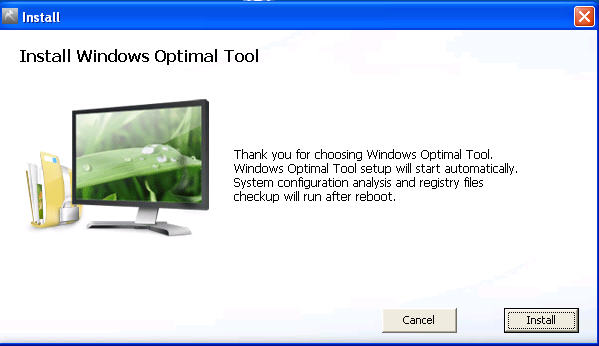
How to remove WindowsOptimalTool

WindowsOptimalTool is a rogue security product in the Privacy Center family that pretends to find system and registry errors on a victim’s machine, in order to frighten him or her into purchasing this useless application.

 Click to Enlarge
Click to Enlarge

If WindowsOptimalTool has infected your PC, you should remove it immediately. Click here to use VIPRE to remove Windows Express Help from your computer now.

Christopher Boyd

How to remove Windows Safety Guarantee

Windows Safety Guarantee is a rogue security product in the Privacy Center family that pretends to find system and registry errors on a victim’s machine, in order to frighten him or her into purchasing this useless application.

 Click to Enlarge
Click to Enlarge

If Windows Safety Guarantee has infected your PC, you should remove it immediately. Click here to use VIPRE to remove Windows Express Help from your computer now.


Christopher Boyd

How to remove WindowsAVSoftware

WindowsAVSoftware is a rogue security product in the Privacy Center family that pretends to find system and registry errors on a victim’s machine, in order to frighten him or her into purchasing this useless application.

 Click to Enlarge


Click to Enlarge

There is a very low detection rate for this - 4/41, and we detect it as Trojan.Win32.Generic.pak!cobra.

If WindowsAVSoftware has infected your PC, you should remove it immediately. Click here to use VIPRE to remove Windows Express Help from your computer now.

Christopher Boyd

Friday, February 18, 2011

How to remove Windows Express Help


Windows Express Help is a rogue security product in the Privacy Center family that pretends to find system and registry errors on a victim’s machine in order to frighten him or her into purchasing this useless application.

Windows Express Help graphic interface


(Click on graphic to enlarge)

Windows Express Help install screen


(Click on graphic to enlarge)

How to remove Windows Express Help:


If Windows Express Help has infected your PC, you should remove it immediately. Click here to use VIPRE to remove Windows Express Help from your computer now.

Tuesday, February 15, 2011

How to remove Windows User Satellite

Windows User Satellite is a rogue security product in the Privacy Center family that pretends to find system and registry errors and malicious code on a victim’s machine in order to frighten him or her into purchasing this useless application.

VIPRE detection name: Trojan.Win32.Generic.pak!cobra

Windows User Satellite graphic interface

(Click on graphic to enlarge)

Windows User Satellite warning screen


(Click on graphic to enlarge)

How to remove Windows User Satellite:

If  Windows User Satellite has infected your pc, you should remove it immediately. Click here to use VIPRE to remove Windows User Satellite from your computer now.

Monday, February 14, 2011

How to remove Windows Problems Solution

Windows Problems Solution is a rogue security product in the Privacy Center family that pretends to find system and registry errors and malicious code on a victim’s machine in order to frighten him or her into purchasing this useless application.

Windows Problems Solution graphic interface


(Click on graphic to enlarge)

Windows Problems Solution warning screen


(Click on graphic to enlarge)

Windows Problems Solution install screen

(Click on graphic to enlarge)

How to remove Windows Problems Solution:

If Windows Problems Solution has infected your pc, you should remove it immediately. Click here to use VIPRE to remove Windows Problems Solution from your computer now.

Friday, February 11, 2011

How to remove Windows Optimal Settings

Windows Optimal Settings is a rogue security product the Privacy Center family that pretends to find system and registry errors on a victim’s machine in order to frighten him or her into purchasing this useless application.

Windows Optimal Settings graphic interface


(Click on graphic to enlarge)

How to remove Windows Optimal Settings:

If Windows Optimal Settings has infected your pc, you should remove it immediately. Click here to use VIPRE to remove Windows Optimal Settings from your computer now.

How to remove Antivirus System 2011


Antivirus System 2011 is a rogue security product in the UnVirex family that pretends to find malicious code on a victim’s machine in order to frighten him or her into purchasing this useless application.

Antivirus System 2011 graphic interface


(Click on graphic to enlarge)

How to remove Antivirus System 2011:


If  Antivirus System 2011 has infected your pc, you should remove it immediately. Click here to use VIPRE to remove Antivirus System 2011 from your computer now.

Thursday, February 10, 2011

How to remove Windows Optimal Solution

Windows Optimal Solution is a rogue security product in the Privacy Center family. It pretends to find malware as well as system and registry errors on a victim’s machine in order to frighten him or her into purchasing this useless application.

Windows Optimal Solution graphic interface


(Click on graphic to enlarge)

Fake Microsoft Security Essentials alert screen


(Click on graphic to enlarge)

Windows Optimal Solution install screen
s


(Click on graphic to enlarge)


(Click on graphic to enlarge)

How to remove Windows Optimal Solution:

If Windows Optimal Solution has infected your PC, you should remove it immediately. Click here to use VIPRE to remove Windows Optimal Solution from your computer now.

Wednesday, February 9, 2011

How to remove AntiVira AV


AntiVira AV is a rogue security product in the FakeSpyPro family that pretends to find malicious code on a victim’s machine in order to frighten him or her into purchasing this useless application.

VIPRE detection name: Trojan.Win32.Generic.pak!cobra

AntiVira AV graphic interface


(Click on graphic to enlarge)

How to remove AntiVira AV:

If  AntiVira AV has infected your pc, you should remove it immediately. Click here to use VIPRE to remove AntiVira AV from your computer now.

How to remove Windows Care Tool

Windows Care Tool is a rogue security product in the Privacy Center family that pretends to find system and registry errors on a victim’s machine in order to frighten him or her into purchasing this useless application.

Windows Care Tool graphic interface


(Click on graphic to enlarge)

Windows Care Tool install screen


(Click on graphic to enlarge)

How to remove Windows Care Tool:


If Windows Care Tool has infected your pc, you should remove it immediately. Click here to use VIPRE to remove Windows Care Tool from your computer now.

Tuesday, February 8, 2011

How to remove Windows Wise Protection


Windows Wise Protection is a rogue security product in the Privacy Center family that pretends to find system and registry errors on a victim’s machine in order to frighten him or her into purchasing this useless application.

Windows Wise Protection graphic interface


(Click on graphic to enlarge)

Windows Wise Protection install screen


 (Click on graphic to enlarge)

How to remove Windows Wise Protection:

If Windows Wise Protection has infected your PC, you should remove it immediately. Click here to use VIPRE to remove Windows Wise Protection from your computer now.

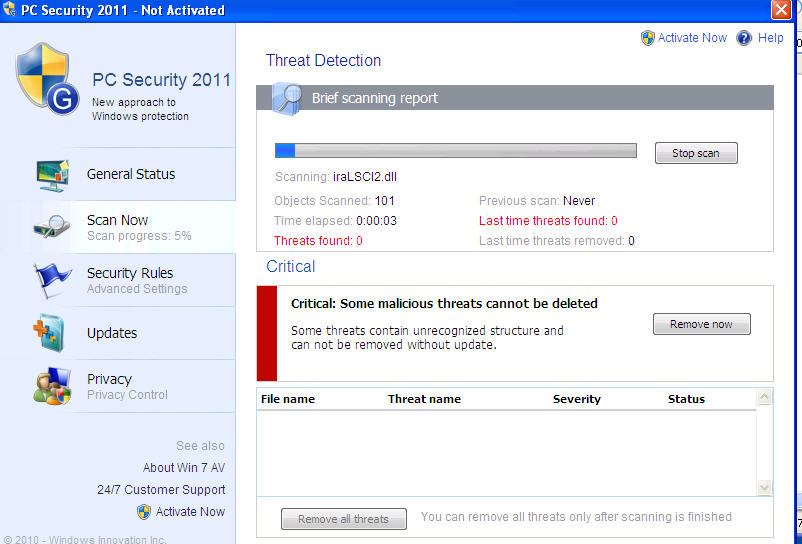
How to remove PC Security 2011

PC Security 2011 is a rogue security product in the FakespyPro family that pretends to find malicious code on a victim’s machine in order to frighten him or her into purchasing this useless application.

PC Security 2011 graphic interface


(Click on graphic to enlarge)

PC Security 2011 fake warning screen


(Click on graphic to enlarge)

PC Security 2011 fake warning screen


(Click on graphic to enlarge)

PC Security 2011 payment screen


(Click on graphic to enlarge)

How to remove PC Security 2011:


If PC Security 2011 has infected your PC, you should remove it immediately. Click here to use VIPRE to remove PC Security 2011 from your computer now.

Monday, February 7, 2011

How to remove Windows Software Guard


Windows Software Guard is a rogue security product in the Privacy Center family that pretends to find system and registry errors on a victim’s machine in order to frighten him or her into purchasing this useless application.

Windows Software Guard graphic interface


(Click on graphic to enlarge)

Windows Software Guard install screen


(Click on graphic to enlarge)

How to remove Windows Software Guard:


If  Windows Software Guard has infected your pc, you should remove it immediately. Click here to use VIPRE to remove Windows Software Guard from your computer now.

How to remove Windows Safety Protection


Windows Safety Protection is a rogue security product that pretends to find system and registry errors on a victim’s machine in order to frighten him or her into purchasing this useless application. It’s a member of the Privacy Center family.

VIPRE detection name: Trojan.Win32.Generic.pak!cobra

Windows Safety Protection graphic interface

 
(Click on graphic to enlarge)

WindowsSafetyProtection install screen


(Click on graphic to enlarge)


How to remove Windows Safety Protection:


If  Windows Safety Protection has infected your pc, you should remove it immediately. Click here to use VIPRE to remove Windows Safety Protection from your computer now.