Wednesday, March 30, 2011

How to Remove Windows Process Regulator Rogue


The Windows Process Regulator rogue is a fake security application that uses aggressive, and deceptive advertising through fake alert pop-ups, browser and desktop hijacking, blocking the running of other applications used in the Fake Alert pop-ups to scare users into thinking they are infected to goad them into purchasing the fake security application.


Click to enlarge

Important Warning: It is possible to manually remove this fake security program, however, to insure no risk of damage to the infected computer, it is advisable to use an Antivirus/Antispyware application like Vipre.

Click here to download a free 30-day trial of VIPRE now.

Tuesday, March 29, 2011

How to Remove Windows Repair Fake System Deframentor (FakeSysDef) rogue


The Windows Repair rogue is part of the FakeSysDef (Fake System Defragmenter) family of rogues which is a fake security application that uses aggressive, and deceptive advertising through fake alert pop-ups showing system and hard drive errors, browser and desktop hijacking, blocking the running of other applications used in the Fake Alert pop-ups to scare users into thinking they are infected to goad them into purchasing the fake security application.


Click to Enlarge
Important Warning:

It is possible to manually remove this fake security program, however, to insure no risk of damage to the infected computer, it is advisable to use an Antivirus/Antispyware application like Vipre.

Click here to download a free 30-day trial of VIPRE now.

...

Monday, March 28, 2011

How to Remove Windows Expansion System Rogue


The Windows Expansion System rogue is a fake security application that uses aggressive, and deceptive advertising through fake alert pop-ups, browser and desktop hijacking, blocking the running of other applications used in the Fake Alert pop-ups to scare users into thinking they are infected to goad them into purchasing the fake security application.


Click to Enlarge

Important Warning: It is possible to manually remove this fake security program, however, to insure no risk of damage to the infected computer, it is advisable to use an Antivirus/Antispyware application like Vipre.

Click here to download a free 30-day trial of VIPRE now.

Saturday, March 26, 2011

How to Remove MS Removal Tool Rogue


The MS Removal Tool rogue is from the Win Web Security Family and is a fake security application that uses aggressive, and deceptive advertising through fake alert pop-ups, browser and desktop hijacking, blocking the running of other applications used in the Fake Alert pop-ups to scare users into thinking they are infected to goad them into purchasing the fake security application.
 
|

Files and Locations:%COMMON_APPDATA%\< Random alpha/ numerical files names> .exe

The MS Removal Tool rogue can be removed with manually, however, becasue of blocking apps and possible infections by other types of Trojan, it is recommend to use our Antivirus removal tool, VIPRE Antivirus.
 

You can download a free trial to remove the MS removal Tool rogue by clicking on the link below:
 

http://www.vipreantivirus.com/Antivirus-Trial/VIPRE-Antivirus/
 

 If you are unable to download and install our malware removal tool because the rogue has infected your computer and is not allowing you to install the program, you can use our VIPRE Rescue Disc here:
 

http://live.sunbeltsoftware.com/


Friday, March 25, 2011

How to remove the Windows Power Expansion rogue

The Windows Power Expansion rogue is a fake security application that uses aggressive, and deceptive advertising through fake alert pop-ups, browser and desktop hijacking, blocking the running of other applications used in the Fake Alert pop-ups to scare users into thinking they are infected to goad them into purchasing the fake security application.


Click to Enlarge

Important Warning:
It is possible to manually remove this fake security program, however, to insure no risk of damage to the infected computer, it is advisable to use an Antivirus/Antispyware application like Vipre.

Click here to download a free 30-day trial of VIPRE now.

...

Thursday, March 24, 2011

How to Remove Windows Simple Protector Rogue

The Windows Simple Protector rogue is a fake security application that uses aggressive, and deceptive advertising through fake alert pop-ups, browser and desktop hijacking, blocking the running of other applications used in the Fake Alert pop-ups to scare users into thinking they are infected to goad them into purchasing the fake security application.

Click to Enlarge

Important Warning: It is possible to manually remove this fake security program, however, to insure no risk of damage to the infected computer, it is advisable to use an Antivirus/Antispyware application like Vipre.

Click here to download a free 30-day trial of VIPRE now.

Wednesday, March 23, 2011

How to Remove Windows Recovery FakeSysDef (Fake System Defragmenter) Rogue

The Windows Recovery rogueis part of the FakeSysDef (Fake System Defragmenter family of rogues which is a fake security application that uses aggressive, and deceptive advertising through fake alert pop-ups showing system and hard drive errors, browser and desktop hijacking, blocking the running of other applications used in the Fake Alert pop-ups to scare users into thinking they are infected to goad them into purchasing the fake security application.


Click to Enlarge

Click to Enlarge

Important Warning:It is possible to manually remove this fake security program, however, to insure no risk of damage to the infected computer, it is advisable to use an Antivirus/Antispyware application like VIPRE.

Click here to download a free 30-day trial of VIPRE now.

How to Remove Windows Background Protector Rogue

The Windows Background Protector rogue is a fake security application that uses aggressive, and deceptive advertising through fake alert pop-ups, browser and desktop hijacking, blocking the running of other applications used in the Fake Alert pop-ups to scare users into thinking they are infected to goad them into purchasing the fake security application.

Click to Enlarge

Important Warning: It is possible to manually remove this fake security program, however, to insure no risk of damage to the infected computer, it is advisable to use an Antivirus/Antispyware application like Vipre.

Click here to download a free 30-day trial of VIPRE now.

Tuesday, March 22, 2011

How to Remove Windows Lowlevel Solution Rogue

The Windows Lowlevel Solution rogue is a fake security application that uses aggressive, and deceptive advertising through fake alert pop-ups, browser and desktop hijacking, blocking the running of other applications used in the Fake Alert pop-ups to scare users into thinking they are infected to goad them into purchasing the fake security application.

Click to Enlarge


Important Warning: It is possible to manually remove this fake security program, however, to insure no risk of damage to the infected computer, it is advisable to use an Antivirus/Antispyware application like Vipre.

Click here to download a free 30-day trial of VIPRE now.

Monday, March 21, 2011

How to Remove Clean This Rogue

The CleanThis rogue is a replacement of the ThinkPoint, a member of the FakeRean family which is a fake security application that uses aggressive, and deceptive advertising through fake alert pop-ups, browser and desktop hijacking, blocking the running of other applications used in the Fake Alert pop-ups to scare users into thinking they are infected to goad them into purchasing the fake security application.


Click to Enlarge

Click to Enlarge

Click to Enlarge

Important Warning: It is possible to manually remove this fake security program, however, to insure no risk of damage to the infected computer, it is advisable to use an Antivirus/Antispyware application like Vipre.

Click here to download a free 30-day trial of VIPRE now.

...

How to Remove Windows Support System Rogue


The Windows Support System rogue is a fake security application that uses aggressive, and deceptive advertising through fake alert pop-ups, browser and desktop hijacking, blocking the running of other applications used in the Fake Alert pop-ups to scare users into thinking they are infected to goad them into purchasing the fake security application.

Click to Enlarge

Important Warning: It is possible to manually remove this fake security program, however, to insure no risk of damage to the infected computer, it is advisable to use an Antivirus/Antispyware application like Vipre.

Click here to download a free 30-day trial of VIPRE now.


...

Friday, March 18, 2011

How to Remove Windows Emergency System Rogue


The Windows Emergency System rogue is a fake security application that uses aggressive, and deceptive advertising through fake alert pop-ups, browser and desktop hijacking, blocking the running of other applications used in the Fake Alert pop-ups to scare users into thinking they are infected to goad them into purchasing the fake security application.

Click to Enlarge

Important Warning: It is possible to manually remove this fake security program, however, to insure no risk of damage to the infected computer, it is advisable to use an Antivirus/Antispyware application like Vipre.

Click here to download a free 30-day trial of VIPRE now.


...

Thursday, March 17, 2011

How to Remove System Diagnostic .FakeSysDef


The System Diagnostic rogue is part of the FakeSysDef family of rogues which is a fake security application that uses aggressive, and deceptive advertising through fake alert pop-ups showing system and hard drive errors, browser and desktop hijacking, blocking the running of other applications used in the Fake Alert pop-ups to scare users into thinking they are infected to goad them into purchasing the fake security application.

Click to Enlarge

Important Warning: It is possible to manually remove this fake security program, however, to insure no risk of damage to the infected computer, it is advisable to use an Antivirus/Antispyware application like Vipre.

Click here to download a free 30-day trial of VIPRE now.


...

How to Remove Windows Safe Mode FakeSysDef


The Windows Safe Mode rogue is part of the FakeSysDef family of rogues which is a fake security application that uses aggressive, and deceptive advertising through fake alert pop-ups showing system and hard drive errors, browser and desktop hijacking, blocking the running of other applications used in the Fake Alert pop-ups to scare users into thinking they are infected to goad them into purchasing the fake security application.

Click to Enlarge

Important Warning: It is possible to manually remove this fake security program, however, to insure no risk of damage to the infected computer, it is advisable to use an Antivirus/Antispyware application like VIPRE.

Click here to download a free 30-day trial of VIPRE now.


...

How to Remove Windows Efficiency Magnifier

The Windows Efficiency Magnifier rogue, a member of the Privacy Center Family, is a fake security application that uses aggressive, and deceptive advertising through fake alert pop-ups, browser and desktop hijacking, blocking the running of other applications used in the Fake Alert pop-ups to scare users into thinking they are infected to goad them into purchasing the fake security application.

Click to Enlarge

Important Warning: It is possible to manually remove this fake security program, however, to insure no risk of damage to the infected computer, it is advisable to use an Antivirus/Antispyware application like Vipre.

Click here to download a free 30-day trial of VIPRE now.

...

Wednesday, March 16, 2011

How to Remove E-Set Antivirus 2011 FakeXPA

The E-Set Antivirus 2011 is a rogue from the FakeXPA (XP Antivirus) Family and is a fake security application that uses aggressive, and deceptive advertising through fake alert pop-ups, browser and desktop hijacking, blocking the running of other applications used in the Fake Alert pop-ups to scare users into thinking they are infected to goad them into purchasing the fake security application.

Click to Enlarge

Important Warning:
It is possible to manually remove this fake security program, however, to insure no risk of damage to the infected computer, it is advisable to use an Antivirus/Antispyware application like Vipre.
Click here to download a free 30-day trial of VIPRE now.


...

How to Remove Best Malware Protection


The Best Malware Protection rogue is a member of the FakeVimes family of rogues and is a fake security application that uses aggressive, and deceptive advertising through fake alert pop-ups, browser and desktop hijacking,c Setting a Proxy in Internet Options for search engine re-direct hijackings, blocking the running of other applications used in the Fake Alert pop-ups to scare users into thinking they are infected to goad them into purchasing the fake security application.

Click to Enlarge

Important Warning:
It is possible to manually remove this fake security program, however, to insure no risk of damage to the infected computer, it is advisable to use an Antivirus/Antispyware application like Vipre.

Click here to download a free 30-day trial of VIPRE now.


...

How to Remove WindowsThreatsRemoving


The Windows Threats Removing rogue is a fake security application that uses aggressive, and deceptive advertising through fake alert pop-ups, browser and desktop hijacking, blocking the running of other applications used in the Fake Alert pop-ups to scare users into thinking they are infected to goad them into purchasing the fake security application.

Click to Enlarge

Important Warning: It is possible to manually remove this fake security program, however, to insure no risk of damage to the infected computer, it is advisable to use an Antivirus/Antispyware application like Vipre.

Click here to download a free 30-day trial of VIPRE now.

...

Monday, March 14, 2011

How to remove Windows Remedy


The Windows Remedy rogue is a fake security application that uses aggressive, and deceptive advertising through fake alert pop-ups showing system and hard drive errors, browser and desktop hijacking, blocking the running of other applications used in the Fake Alert pop-ups to scare users into thinking they are infected to goad them into purchasing the fake security application.


Click to Enlarge


Important Warning: It is possible to manually remove this fake security program, however, to insure no risk of damage to the infected computer, it is advisable to use an Antivirus/Antispyware application like VIPRE.

Click here to download a free trial of VIPRE now

Sunday, March 13, 2011

How to remove Windows Diagnostic FakeSysDef rogue

The Windows Diagnostic rogue, part of the FakeSysDef ( Fake System Defragmenter) Family, is a fake security application that uses aggressive, and deceptive advertising through fake alert pop-ups showing system and hard drive errors, browser and desktop hijacking, blocking the running of other applications used in the Fake Alert pop-ups to scare users into thinking they are infected to goad them into purchasing the fake security application.

Click to Enlarge


Click to Enlarge


Important Warning: It is possible to manually remove this fake security program, however, to insure no risk of damage to the infected computer, it is advisable to use an Antivirus/Antispyware application like Vipre.

Click here to download a free 30-day trial of VIPRE now.


Friday, March 11, 2011

How to Remove Windows Troubles Remover

The Windows Troubles Remover rogue is a fake security application that uses aggressive, and deceptive advertising through fake alert pop-ups, browser and desktop hijacking, blocking the running of other applications used in the Fake Alert pop-ups to scare users into thinking they are infected to goad them into purchasing the fake security application.


Click to Enlarge

Important Warning: It is possible to manually remove this fake security program, however, to insure no risk of damage to the infected computer, it is advisable to use an Antivirus/Antispyware application like VIPRE.

Click here to download a free 30-day trial of VIPRE now.


...

Thursday, March 10, 2011

How to Remove System Defender

The System Defender rogue is a fake security application that uses aggressive, and deceptive advertising through fake alert pop-ups, browser and desktop hijacking, blocking the running of other applications used in the Fake Alert pop-ups to scare users into thinking they are infected to goad them into purchasing the fake security application.

Click to Enlarge

Important Warning: It is possible to manually remove this fake security program, however, to insure no risk of damage to the infected computer, it is advisable to use an Antivirus/Antispyware application like Vipre.

Click here to download a free 30-day trial of VIPRE now.

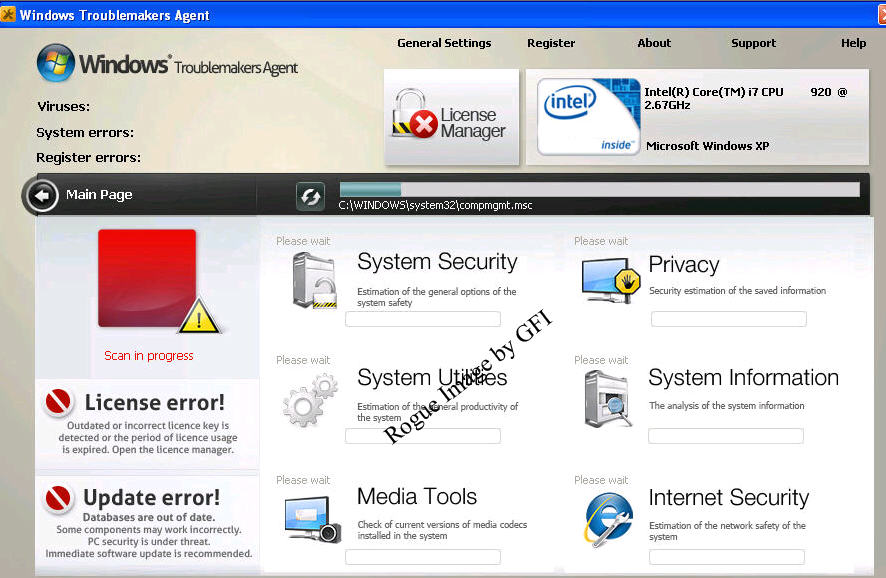
How To Remove Windows Troublemakers Agent

The Windows Troublemakers Agent rogue is a fake security application that uses aggressive, and deceptive advertising through fake alert pop-ups, browser and desktop hijacking, blocking the running of other applications used in the Fake Alert pop-ups to scare users into thinking they are infected to goad them into purchasing the fake security application.

Click to Enlarge

Click to Enlarge

Important Warning: It is possible to manually remove this fake security program, however, to insure no risk of damage to the infected computer, it is advisable to use an Antivirus/Antispyware application like VIPRE.

Wednesday, March 9, 2011

How to remove Windows Servant System


The Windows Servant System rogue
is a fake security application that uses aggressive, and deceptive advertising through fake alert pop-ups, browser and desktop hijacking, blocking the running of other applications used in the Fake Alert pop-ups to scare users into thinking they are infected to goad them into purchasing the fake security application.
Click to Enlarge

Click to Enlarge

Important Warning: It is possible to manually remove this fake security program, however, to insure no risk of damage to the infected computer, it is advisable to use an Antivirus/Antispyware application like Vipre.

Tuesday, March 8, 2011

How to remove Windows Defence Center


The Windows Defence Center rogue
is a fake security application that uses aggressive, and deceptive advertising through fake alert pop-ups, browser and desktop hijacking, blocking the running of other applications used in the Fake Alert pop-ups to scare users into thinking they are infected to goad them into purchasing the fake security application.
Click to Enlarge

Click to Enlarge

Important Warning: It is possible to manually remove this fake security program, however, to insure no risk of damage to the infected computer, it is advisable to use an Antivirus/Antispyware application like Vipre.

Monday, March 7, 2011

How to remove Windows Error Correction

Windows Error Correction rogue is a fake security application that uses aggressive, and deceptive advertising through fake alert pop-ups, browser and desktop hijacking, blocking the running of other applications used in the Fake Alert pop-ups to scare users into thinking they are infected to goad them into purchasing the fake security application.


Click to Enlarge

Click to Enlarge

Important Warning: It is possible to manually remove this fake security program, however, to insure no risk of damage to the infected computer, it is advisable to use an Antivirus/Antispyware application like Vipre.

Sunday, March 6, 2011

How to remove the Antivirus Monitor rogue


The Antivirus Monitor
rogue is a fake security application of the FakeSpyPro family that uses aggressive, deceptive advertising through fake alert pop-ups, browser and desktop hijacking, and blocking the running of other applications used in the Fake Alert pop-ups to scare users into thinking they are infected to goad them into purchasing the fake security application.

Click to Enlarge

Click to Enlarge


Important Warning: It is possible to manually remove this fake security program, however, to insure no risk of damage to the computer, it is advisable to use an Antivirus/Antispyware application like Vipre.  Click here to download a free 30-day trial of VIPRE now.

Christopher Boyd

Friday, March 4, 2011

How to remove XP Home Security

XP Home Security is a fake security application that uses aggressive, deceptive advertising through fake alert pop-ups, browser and desktop hijackings, blocking the running of other applications used for the fake alert pop-ups to scare users into thinking they are infected to goad them into to purchase the fake security application.

Click to Enlarge

If XP Home Security has infected your PC, you should remove it immediately.
Important Warning: It is possible to manually remove this fake security program, however, to ensure no risk of damage to the infected computer, it is advisable to use an Antivirus/Antispyware application like Vipre.


Christopher Boyd

Thursday, March 3, 2011

How to remove Antivirus Antispyware 2011


Antivirus Antispyware 2011 is a rogue security product in the Privacy Center family that uses aggressive, deceptive advertising through fake alert pop-ups, browser and desktop hijackings, blocking the running of other applications used for the fake alert pop-ups to scare users into thinking they are infected to goad them into to purchase the fake security application.

Click to Enlarge

This is where you'll find it:

Folders
%APPDATA%\Antivirus Antispyware 2011
%PROGRAMS%\Antivirus Antispyware 2011

Files
%APPDATA%\Antivirus Antispyware 2011\AntiVirus AntiSpyware.exe
%APPDATA%\Antivirus Antispyware 2011\SecurityManager.exe
%APPDATA%\SecurityHelper.exe

If Antivirus Antispyware 2011 has infected your system, you should remove it immediately.

Important Warning: It is possible to manually remove this fake security program, however, to ensure no risk of damage to the infected computer, it is advisable to use an Antivirus/Antispyware application like Vipre.


Christopher Boyd

How to remove Windows Debug System

Windows Debug System is a rogue security product in the Privacy Center family that uses aggressive, deceptive advertising through fake alert pop-ups, browser and desktop hijackings, blocking the running of other applications used for the fake alert pop-ups to scare users into thinking they are infected to goad them into to purchase the fake security application.

 Click to Enlarge
Click to Enlarge

If Windows Debug System has infected your PC, you should remove it immediately.

Important Warning: It is possible to manually remove this fake security program, however, to ensure no risk of damage to the infected computer, it is advisable to use an Antivirus/Antispyware application like Vipre.


Christopher Boyd

How to remove AntiMalware GO


AntiMalware GO is a rogue security product in the FakeSpyPro family that is a fake security application that uses aggressive, deceptive advertising through fake alert pop-ups, browser and desktop hijackings, blocking the running of other applications used for the fake alert pop-ups to scare users into thinking they are infected to goad them into to purchase the fake security application.

Click to Enlarge
 If AntiMalware GO has infected your PC, you should remove it immediately.

Important Warning: It is possible to manually remove this fake security program, however, to ensure no risk of damage to the infected computer, it is advisable to use an Antivirus/Antispyware application like Vipre.


Christopher Boyd

Wednesday, March 2, 2011

How to remove Windows Efficiency Manager

Windows Efficiency Manager is a rogue security product in the Privacy Center family that uses aggressive, deceptive advertising through fake alert pop-ups, browser and desktop hijackings, blocking the running of other applications used for the fake alert pop-ups to scare users into thinking they are infected to goad them into to purchase the fake security application.


 Click to Enlarge
Click to Enlarge
Click to Enlarge

 If Windows Efficiency Manager has infected your PC, you should remove it immediately.

Important Warning: It is possible to manually remove this fake security program, however, to ensure no risk of damage to the infected computer, it is advisable to use an Antivirus/Antispyware application like Vipre.


Christopher Boyd

Tuesday, March 1, 2011

How to remove Windows Performance Manager

Windows Performance Manager is a rogue security product in the Privacy Center family that pretends to find system and registry errors on a victim’s machine, in order to frighten him or her into purchasing this useless application.

 Click to Enlarge
 Click to Enlarge
Click to Enlarge


 If Windows Performance Manager has infected your PC, you should remove it immediately.

Christopher Boyd