Showing posts with label FakespyPro. Show all posts

Wednesday, February 9, 2011

How to remove AntiVira AV


AntiVira AV is a rogue security product in the FakeSpyPro family that pretends to find malicious code on a victim’s machine in order to frighten him or her into purchasing this useless application.

VIPRE detection name: Trojan.Win32.Generic.pak!cobra

AntiVira AV graphic interface


(Click on graphic to enlarge)

How to remove AntiVira AV:

If  AntiVira AV has infected your pc, you should remove it immediately. Click here to use VIPRE to remove AntiVira AV from your computer now.

Tuesday, February 8, 2011

How to remove PC Security 2011

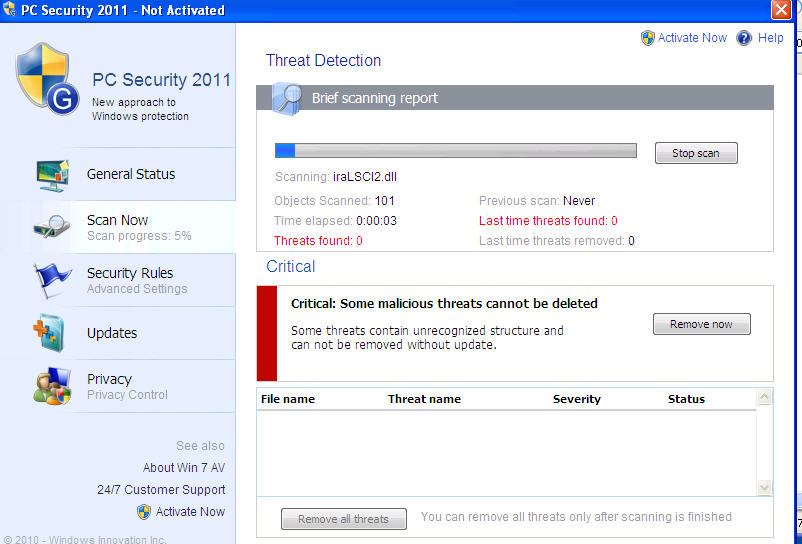
PC Security 2011 is a rogue security product in the FakespyPro family that pretends to find malicious code on a victim’s machine in order to frighten him or her into purchasing this useless application.

PC Security 2011 graphic interface


(Click on graphic to enlarge)

PC Security 2011 fake warning screen


(Click on graphic to enlarge)

PC Security 2011 fake warning screen


(Click on graphic to enlarge)

PC Security 2011 payment screen


(Click on graphic to enlarge)

How to remove PC Security 2011:


If PC Security 2011 has infected your PC, you should remove it immediately. Click here to use VIPRE to remove PC Security 2011 from your computer now.

Wednesday, January 26, 2011

How to remove Antivirus.Net


Antivirus.Net is a rogue security product that pretends to find malicious code on a victim’s machine in order to frighten him or her into purchasing this useless application. It’s a member of the FakeSpyPro family of rogues.

Antivirus.Net graphic interface


(Click on graphic to enlarge)

Antivirus.Net scan window

 
(Click on graphic to enlarge)

PDF Exploit that leads to new FakeSpyPro clone:


(Click on graphic to enlarge)

How to remove Antivirus.Net:

If  Antivirus.Net has infected your pc, you should remove it immediately. Click here to use VIPRE to remove Antivirus.Net from your computer now.

Friday, December 17, 2010

How to remove Antivirus Scan


Antivirus Scan is a rogue security product that pretends to find malicious code on a victim’s machine in order to frighten him or her into purchasing this useless application. It replaces AntivirusAction in the FakeSpyPro family of rogues.

VIPRE detects it as:VirTool.Win32.Obfuscator.ah!m (v)

Antivirus Scan graphic interface

 
(Click on graphic to enlarge)


How to remove Antivirus Scan:


If  Antivirus Scan has infected your pc, you should remove it immediately. Click here to use VIPRE to remove Antivirus Scan from your computer now.

Wednesday, September 8, 2010

Malware Destructor 2011

Malware Destructor 2011 is a rogue security product that presents itself as a Microsoft-related "System Security Pack Upgrade."

(Click on graphic to enlarge)

It pretends to find malicious code on a victim’s machine in order to frighten him or her into purchasing useless software.

(Click on graphic to enlarge)

(Click on graphic to enlarge)

Malware Destructor 2011 is a clone of AVDefender2011.FakeSpyPro that was distributed late in August 2010.

How to remove Malware Destructor 2011:

If Malware Destructor 2011 has infected your pc, you should remove it immediately. Click here to use VIPRE to remove Malware Destructor 2011 from your computer now.

VIPRE already detected the downloader (VirTool.Win32.Obfuscator.da!a (v)) and module it downloaded.

After VIPRE cleans Malware Destructor 2011, a randomly named folder: %APPDATA%\ 72C9D8190B531E44EFA48DBEF901A78F remains. It contains two files which are not executable. One is called enemies-names.txt and contains the fake scan results which the rogue displays. The second file is local.ini which contains the messages that Malware Destructor 2011 displays.

Tuesday, August 31, 2010

AV Defender 2011

AV Defender 2011 is a rogue security product that pretends to find malicious code on a victim’s machine in order to frighten him or her into purchasing this useless application. It presents an alarming graphic user interface:

(Click on graphic to enlarge)

It fakes a “scan” of the potential victim’s machine in order to frighten him or her into making an unwise purchase:

(Click on graphic to enlarge)

The “payment” screen, of course, looks very professional. However the rogue vendors have used graphics of “Antivirus Soft” – evidence that they probably are the same distributors of that rogue as well. Here’s our description of Antivirus Soft from last February.

(Click on graphic to enlarge)

The downloader we found was detected as BehavesLike.Win32.Malware (v) and its executable module was detected as Trojan.Win32.FakeAlert.

This rogue is somewhat similar to those in of the FakeSpyPro family, although the downloader actually creates the module.

AV Defender 2011 creates the following registry key:
HKEY_CURRENT_USERSOFTWARE\AVDEFENDER 2011

It also creates the following files on a victim’s machine:
%APPDATA%\AVDEFENDER2011
%STARTMENU%\AVDEFENDER2011

VIPRE detects it as AVDefender2011.FakeSpyPro

How to remove AV Defender 2011:

If AV Defender 2011 has infected your pc, you should remove it immediately. Click here to use VIPRE to remove AV Defender 2011 from your computer now.

Wednesday, August 25, 2010

Antivir Solution Pro

Antivir Solution Pro is the latest clone of the FakeSpyPro family of rogue security products. Like all rogues, it pretends to scan your machine, allegedly finds malware threats then tries to get you to purchase the software. This is all fiction and Antivir Solution Pro does nothing to protect you from malicious code.

Antivir Solution Pro is a new rebranded clone of the FakeSpyPro and has replaced AVSecuritySuite

VIPRE detects it as: AntivirSolutionPro.FakeSpypro

Creates directory:
%\Documents and Settings%\Local Settings\Application Data\sguxxogix\

Creates the following registry keys:

HKEY_CURRENT_USER\Software\AVSolution
HKEY_LOCAL_MACHINE\Software\AVSolution
HKEY_CURRENT_USER\Software\AVSuitE
HKEY_LOCAL_MACHINE\Software\AVSuitE
HKEY_CURRENT_USER\Software\Microsoft\Internet Explorer\Download
HKEY_CURRENT_USER\Software\Microsoft\Windows\CurrentVersion\Policies\Attachments
HKEY_CURRENT_USER\Software\Microsoft\Windows\CurrentVersion\Policies\Associations

If Antivir Solution Pro has infected your pc, you should remove it immediately. Click here to use VIPRE to remove PC Defender Antivirus from your computer now.

Security Suite

Security Suite is a rebranded clone of the FakespyPro family of rogue security products. VIPRE detects it as SecuritySuite.FakeSpyPro. Like all rogues, it is intended to trick victims into thinking they are purchasing a legitimate anti-malware product, when indeed they are purchasing a non-functional application.


Security Suite sets an infected machine’s proxy server to 127.0.0.1. When removing it, that needs to be manually removed (Internet Options | Connections).

The notorious Iframedollars site, which pays affiliates to install malware on victims’ machines, just switched from the AVSecuritySuite.FakeSpypro to SecuritySuite.FakeSpyPro

VIPRE will stop or remove SecuritySuite.FakeSpyPro.

If Security Suite has infected your pc, you should remove it immediately. Click here to use VIPRE to remove PC Defender Antivirus from your computer now.